In Connexus, an asset refers to equipment, functional spaces, or items that support the operations and maintenance of a facility. Unlike a part, which is typically replaced after use, an asset is usually repaired rather than replaced when it breaks down. Assets are also subject to planned maintenance to minimize downtime and extend their lifespan. In our system, we track key details of each asset, including its location, service history, lifespan, and associated costs, to ensure optimal performance and cost-efficiency over time.
For example, an air conditioner is considered an asset in our system. When it breaks down, the goal is to repair it rather than replace it entirely. Within the air conditioner, components like the filter are considered parts, which we can manage in our stock management module.
View Assets in the Web App
The Connexus web app has the following asset views:
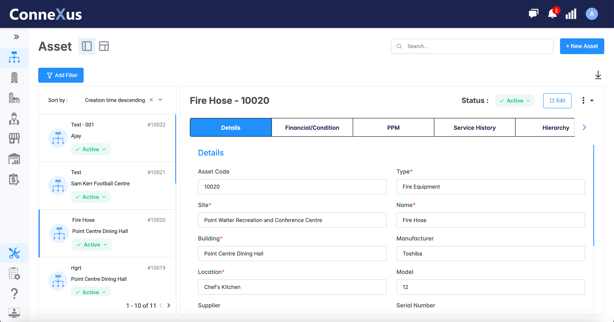
- Split view: shows a list of assets, and details about the selected asset side by side.
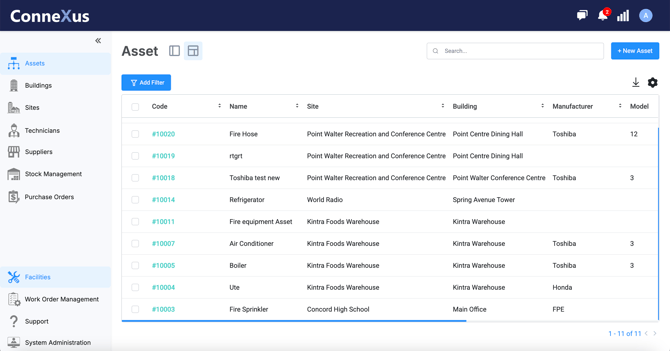
- Grid view: assets in a table or grid format where you can sort them, and edit them in bulk.
Split View
To access the split view:
- From the sidebar, select Assets.
- In the Assets module, select the (Split View) icon to switch to the Split view.
The list pane on the left shows the list of assets in your organization.
- Use the Sort By option to choose how you want to see your assets listed.
- Select an asset from the list to display the details pane on the right. The details pane displays the form fields for the selected asset.
Grid View
To access the table view:
- From the sidebar, select Assets.
- In the Assets module, select the (Table View) icon to switch to the Table view.
The Grid View is a compact table of assets and asset form fields. It gives you an overview of the assets in your organization. You can sort assets and use grid view to bulk-edit assets.