
About Buildings
Buildings represent individual structures or functional spaces under a site. Buildings can be further subdivided into multiple locations. Each location typically refers to a specific area within a building. This is especially useful when there are multiple locations within a building as it helps direct technicians directly to the precise location they need to be.
Another factor to why we seperate sites to buildings is each building will typically have different insurances, fire safety regulations and compliance.
Locations
Locations are specific areas or rooms within a building where assets, maintenance tasks, or activities are carried out. Locations help pinpoint the exact spot for operations, make it easy for tenants/staff to log requests and for maintenance staff to find the precise location of their task.
Planned Preventative Maintenance (PPM)
Within the building module, you can view and manage all Planned Preventive Maintenance (PPM) schedules for that specific building. This includes routine tasks like inspections, cleaning, and servicing of critical assets such as HVAC systems and fire equipment. You can also add or update new PPM tasks from here.
Assets
Within the building module, you can view all assets associated with the building, such as HVAC systems, electrical equipment, plumbing, and safety devices. You can easily add new assets here, ensuring that all relevant components are tracked and managed efficiently.
Contacts
Building contacts refer to key individuals or organizations associated with the management, maintenance, and operations of a building. This may include facility managers, security personnel, front desk staff, owners/tenants, and emergency contacts. Maintaining up-to-date contact information for these individuals ensures quick communication and coordination for routine tasks, emergencies and compliance requirements.
Documents
Documents and images can be attached to building records to provide essential information about the property, its assets, and operational procedures. This may include building diagrams, compliance documents, evacuation procedures, floor plans, and maintenance instructions.
Split View
To access the split view:
- From the sidebar, select Buildings.
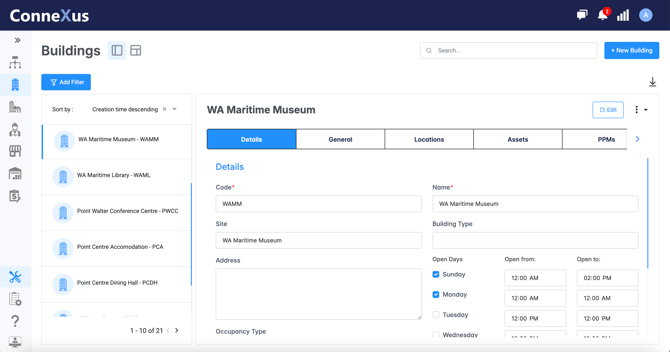
- In the Buildings module, select the (Split View) icon to switch to the Split view.
The list pane on the left shows the list of buildings in your organization.
- Use the Sort By option to choose how you want to see your buildings listed.
- Select a Building from the list to display the details pane on the right. The details pane displays the form fields for the selected Building.
Grid View
To access the table view:
- From the sidebar, select Buildings.
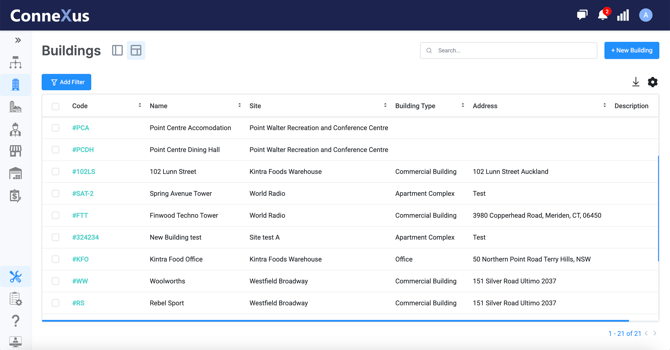
- In the Buildings module, select the (Grid View) icon to switch to the Grid View.
The Grid View is a compact table of Buildings and Buildings form fields. It gives you an overview of the Buildings in your organization. You can sort Buildings and use grid view to bulk-edit Buildings.
Building Fields
| Building Code | A unique identifier for the building. |
| Building Name | The official name of the building. |
| Building Type | The classification of the building (e.g., office, warehouse). |
| Address | The physical location of the building, including street and postal code. |
| Occupancy Type | Indicates if the building is leased or owned. |
| Opening Days/Hours | The operational hours or availability of the building. |
| Cost Centre | The financial category associated with the building's expenses. |
| Description | A brief overview or details about the building. |
| Location | The building's position within the site or its geographic context. |
| Net Internal Area | The usable space within the building measured in square units. |
| Total Lettable Area | The total space available for leasing within the building. |
| Building Insurer | The insurance provider covering the building. |
| Fire Certificate | Documentation confirming compliance with fire safety regulations. |
| Assets | The equipment or systems located within the building. |
| PPM (Planned Preventative Maintenance) | Ongoing maintenance tasks scheduled for the building. |
| Contacts |
Key individuals associated with the building for communication or support. |
| Documents | Records related to the building, such as insurance policies, compliance certificates and building blueprints. |